

Deliver an application
In the Quickstart, Konfidence was installed and the example application was deployed to a development stage. This guide uses the kden CLI to explore that setup and then promote the example application to the production stage.
Prerequisites
A completed Quickstart: a local cluster with the example application running.
The kden CLI installed.
The Konfidence API reachable at
http://localhost:8090. Keep the port-forward from the Quickstart running:bashkubectl -n konfidence-system port-forward svc/konfidence-api 8090:8090
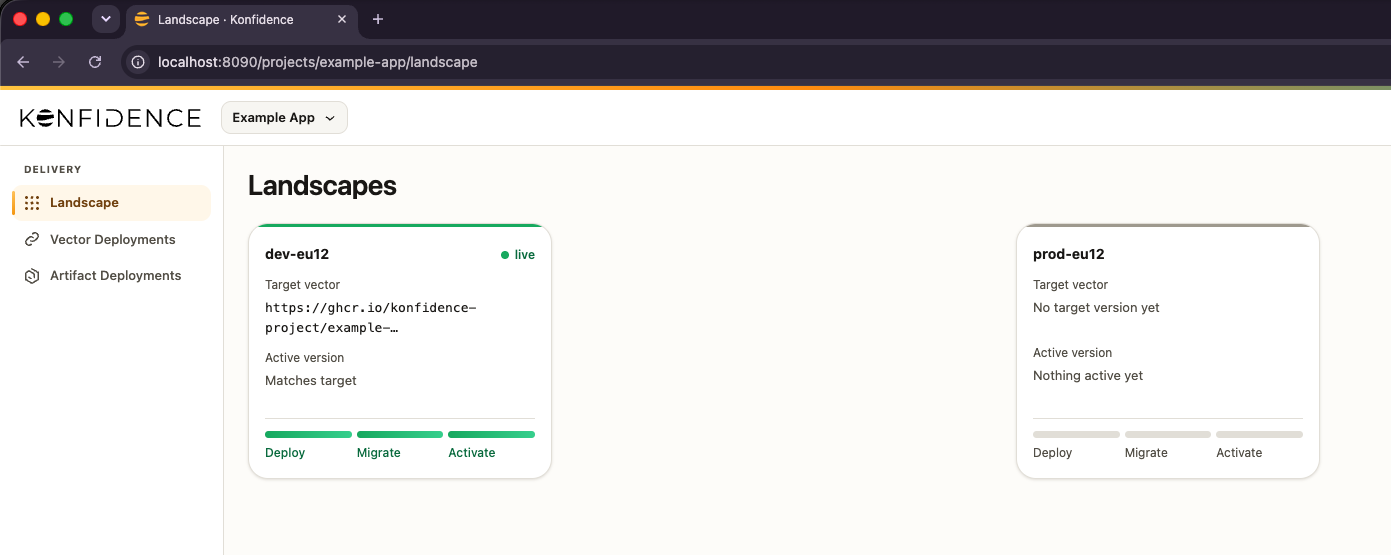
The dashboard's Landscapes view shows the starting point: dev-eu12 is live with the example application, and prod-eu12 has no version yet.
Sign in to the CLI
The CLI needs its own session. Sign in through the browser before running the commands in this guide:
kden loginSelect Continue with SSO, then sign in as Local Admin. The CLI connects to http://localhost:8090 by default.
Inspect the existing resources
The Quickstart created a project, two landscapes, their stages, and a promotion config. Review each one with the CLI.
Project
A project is the organizational boundary for an application's resources. It owns a dedicated namespace that holds its landscapes, vector templates, and promotion configs.
$ kden project list --output pretty
 ID            Name
example-app Example App$ kubectl get projects
NAME DISPLAY NAME NAMESPACE READY AGE
example-app Example App kden-p-example-app True 5mUse the project ID, example-app, in the commands that follow.
Landscapes
A landscape is an operational boundary within a project. It groups the stages, deployment targets, and deployment resources that share operational requirements, and it owns a namespace for them.
$ kden landscape list -p example-app --output pretty
 ID     Name
 dev    Development
prod Production$ kubectl -n kden-p-example-app get landscapes
NAME DISPLAY NAME PROJECT NAMESPACE READY AGE
dev Development example-app kden-l-dev True 5m
prod Production example-app kden-l-prod True 5mStages
A stage is a checkpoint in the delivery flow that selects one vector to deliver. List the stages in the dev landscape.
$ kden stage list -p example-app -l dev --output pretty
 ID         Name       Landscape   Active Version           Status
dev-eu12 dev-eu12 dev dev-eu12-5dk7wm6b9mxzb Ready$ kubectl -n kden-l-dev get stages
NAME READY AGE VECTOR ACTIVE-VERSION
dev-eu12 True 5m https://ghcr.io/konfidence-project/example-app//github.com/konfidence-project/example-app/vector:0.1.0-f486ecb dev-eu12-5dk7wm6b9mxzbdev-eu12 runs the active version dev-eu12-5dk7wm6b9mxzb, and its status is Ready. This is the example application deployed to development.
The prod-eu12 stage in the prod landscape has no active version yet. Approving the promotion selects the vector for that stage; the version becomes active after deployment succeeds.
Promotion
A promotion config defines a promotion flow from a source stage to a target stage. When the source vector differs from the target's, Konfidence creates a promotion that updates the target stage to select that vector, without rebuilding or copying it.
$ kden vector-promotion list -p example-app --output pretty
dev-to-prod (dev-eu12 → prod-eu12)
 ID              Source     Target      Vector                           Status
dev-to-prod-1 dev-eu12 prod-eu12 https://ghcr.io/konfidence-pr… Waiting$ kubectl -n kden-p-example-app get vectorpromotion
NAME CONFIG SOURCE TARGET STATE AGE
dev-to-prod-1 dev-to-prod dev-eu12 prod-eu12 Waiting 5mThe promotion requires manual approval by default before it reaches production. The dev-to-prod-1 promotion is in the Waiting state, holding the same vector that runs in dev-eu12.
Approve the promotion to production
Approve the waiting promotion by its ID, dev-to-prod-1:
kden vector-promotion approve dev-to-prod-1 -p example-appPass the promotion ID (dev-to-prod-1), not the config ID (dev-to-prod). Konfidence updates prod-eu12 to select that vector and deploys it.
Confirm the promotion succeeded:
$ kden vector-promotion list -p example-app --output pretty
dev-to-prod (dev-eu12 → prod-eu12)
 ID              Source     Target      Vector                           Status
dev-to-prod-1 dev-eu12 prod-eu12 https://ghcr.io/konfidence-pr… Succeeded$ kubectl -n kden-p-example-app get vectorpromotion
NAME CONFIG SOURCE TARGET STATE AGE
dev-to-prod-1 dev-to-prod dev-eu12 prod-eu12 Succeeded 6mThe dev-to-prod-1 promotion is now in the Succeeded state. This confirms that production selects the vector; the rollout can still be running. Watch the stage until ACTIVE-VERSION contains a value:
kubectl -n kden-l-prod get stage prod-eu12 -wPress Ctrl+C to stop watching, then inspect the result. If the active version stays empty, check kubectl -n kden-l-prod get pods and kubectl -n kden-l-prod get events --sort-by=.lastTimestamp. For further checks, see Stage troubleshooting.
$ kden stage list -p example-app -l prod --output pretty
 ID          Name        Landscape   Active Version            Status
prod-eu12 prod-eu12 prod prod-eu12-7f3k2m9d4qxzc Ready$ kubectl -n kden-l-prod get stages
NAME READY AGE VECTOR ACTIVE-VERSION
prod-eu12 True 6m https://ghcr.io/konfidence-project/example-app//github.com/konfidence-project/example-app/vector:0.1.0-f486ecb prod-eu12-7f3k2m9d4qxzcprod-eu12 now runs the same vector as dev-eu12. The application was promoted without rebuilding it.
Try the running application
The example has a candidates service that stores candidates and an interviews service that books interviews. When you book an interview, the interviews service looks up the candidate through the candidates service. This lets you check a real request between the services in the deployed vector.
Connect to the services
For this local exercise, use port-forwarding to call the services directly. In a new terminal, find the candidates Service in the Quickstart's production landscape and forward it:
CANDIDATES_SERVICE=$(kubectl -n kden-l-prod get service -l app=candidates -o name)
kubectl -n kden-l-prod port-forward "$CANDIDATES_SERVICE" 18091:80
Keep it running. In another terminal, forward the interviews Service:
INTERVIEWS_SERVICE=$(kubectl -n kden-l-prod get service -l app.kubernetes.io/name=interviews -o name)
kubectl -n kden-l-prod port-forward "$INTERVIEWS_SERVICE" 18092:80
Run the following requests in a third terminal. Because port-forwarding bypasses the ingress gateway, supply X-Vector-ID yourself. In this setup, use the active stage-version name as the runtime vector ID:
VECTOR_ID=$(kubectl -n kden-l-prod get stage prod-eu12 \
  -o jsonpath='{.status.activeStageVersion.name}')
echo "$VECTOR_ID"
The output is a name such as prod-eu12-7f3k2m9d4qxzc. Use the value from your cluster, not the OCM reference beginning with https://ghcr.io/. See Access vector data for the runtime contract.
Create a candidate and book an interview
Create a candidate with synthetic data:
curl --include --silent --show-error http://localhost:18091/candidates \
  -H 'Content-Type: application/json' \
  -H "X-Vector-ID: $VECTOR_ID" \
  --data '{"name":"Example Candidate","email":"candidate@example.invalid"}'
Expect HTTP 201 and a JSON object containing id, name, and email. Copy the returned id into this variable:
CANDIDATE_ID='<id from the response>'Book a phone interview for that candidate:
curl --include --silent --show-error http://localhost:18092/interviews \
  -H 'Content-Type: application/json' \
  -H "X-Vector-ID: $VECTOR_ID" \
  --data "{\"candidateId\":\"$CANDIDATE_ID\",\"slotTime\":\"2030-01-15T10:00:00Z\",\"slotType\":\"phone\"}"
Expect HTTP 201 and the booking details. The interviews service has resolved the candidates service from the vector's deployment results and forwarded the vector ID on its request.
Observe a feature flag
The example vector has the allow-video-slots flag disabled. Try booking a video interview:
curl --include --silent --show-error http://localhost:18092/interviews \
  -H 'Content-Type: application/json' \
  -H "X-Vector-ID: $VECTOR_ID" \
  --data "{\"candidateId\":\"$CANDIDATE_ID\",\"slotTime\":\"2030-01-15T11:00:00Z\",\"slotType\":\"video\"}"
Expect HTTP 400 with {"error":"slot type video is not enabled for this vector"}. This is the expected application response for the disabled flag. Both requests reached the same deployed application; the vector's configuration determines which booking types it accepts.
Stop the two application port-forwards with Ctrl+C when you are finished. The records remain in the local example database until you delete the Quickstart cluster.
What you've learned
You have:
- inspected the project, landscapes, stages, and promotion the Quickstart created,
- approved the waiting promotion with the
kdenCLI, - confirmed the same vector runs in production, and
- used the running application to check service communication and a feature flag.
Next steps
- Delivery flow to learn how promotions move a vector across stages.